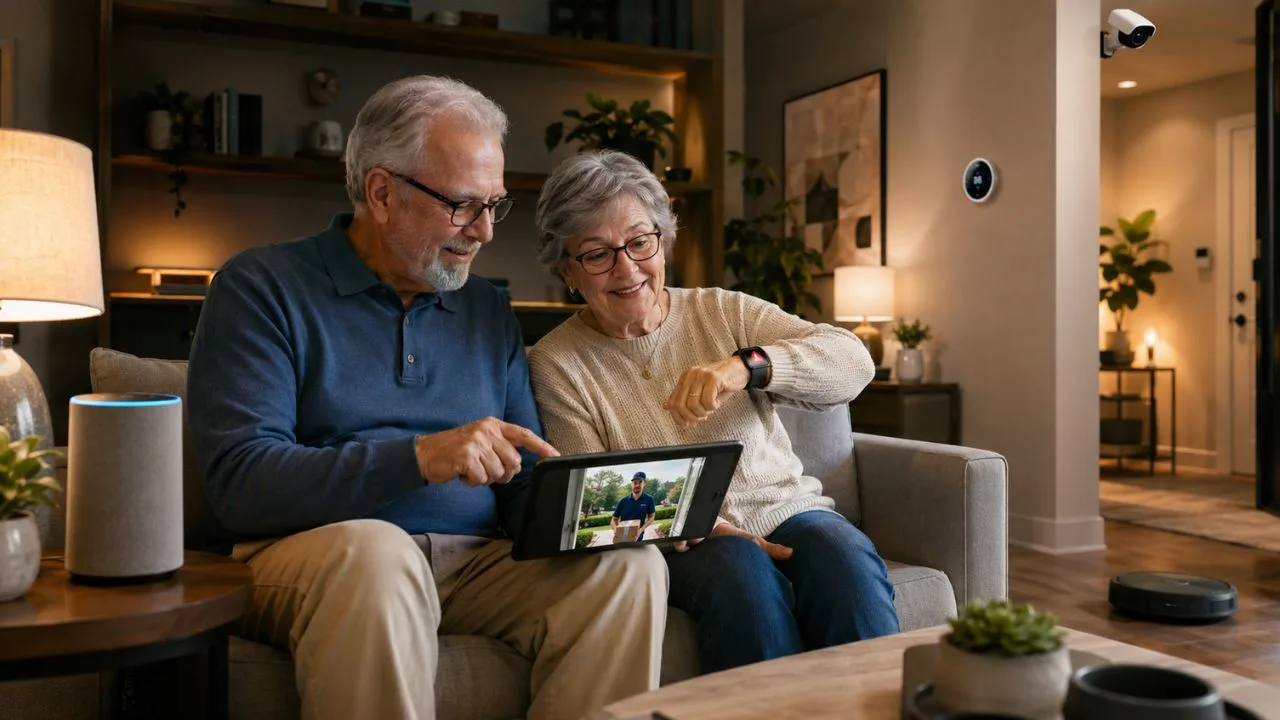
Smart home devices can make everyday activities simpler for older adults who want to remain independent. Voice commands can control lights, adjust room temperature, start reminders, and contact family members. Sensors can also provide early warnings about water leaks, open doors, or unusual activity. The right products should reduce effort without making the home confusing or difficult to manage.
Older adults have different needs, abilities, homes, budgets, and levels of comfort with technology. One person may benefit from voice-controlled lights, while another may prefer a video doorbell or smart thermostat. A useful device should solve a real daily problem instead of adding another application to manage. The best smart home system is usually simple, reliable, and easy to control.
Smart technology should support older adults rather than replace personal care, emergency planning, or regular human contact. A voice assistant may help with reminders, but it cannot guarantee that medicine has been taken correctly. A security camera may show who is outside, but it cannot prevent every crime or emergency. Families should view these products as practical tools within a wider home safety plan.
Privacy, internet access, subscriptions, installation, and software support should be considered before buying anything. Many smart devices require an online account, mobile application, wireless network, and occasional software updates. The Federal Trade Commission recommends checking security features and the expected software support period before purchasing connected products. This guide explains which smart home device categories can offer the most practical value for older adults.
What Makes a Smart Home Device Suitable for Older Adults?
A suitable smart home device should be easy to operate without requiring several complicated steps. Large buttons, clear screens, simple voice commands, and readable notifications can make daily use more comfortable. The device should also continue performing basic functions when a smartphone is unavailable. A smart light, for example, should still work from a normal wall switch.
Voice control can be helpful for a person who finds small buttons or touchscreens difficult to use. It can allow someone to adjust a light or thermostat without walking across a dark room. However, voice systems may occasionally misunderstand words, accents, or background conversations. The home should always include a simple manual method for controlling important devices.
The chosen product should solve a specific problem that the older adult already experiences. Smart lighting may help when reaching switches at night is difficult, while a video doorbell may reduce the need to approach the front door. A thermostat may be useful when small temperature controls are hard to read. Buying devices without a clear purpose often creates more passwords, alerts, and maintenance work.
Family members should involve the older adult in every buying and setup decision. Installing cameras, microphones, locks, or sensors without clear agreement can feel intrusive and reduce trust. The person should understand what information is collected and who can view or control the device. A people-first setup protects independence while providing appropriate support.
Best Smart Displays and Voice Assistants for Older Adults
A smart display combines a voice assistant, speaker, touchscreen, reminders, video calling, and smart home controls. It can provide weather information, calendar events, timers, music, photographs, and visual instructions. A larger screen may be easier to read than a small mobile phone. Voice control also allows common tasks to be completed without navigating several menus.
The Amazon Echo Show 15 is a strong option for users who want a large shared display. Its 15.6-inch screen supports calendars, lists, weather, video calling, entertainment, and compatible smart home controls. The current model also includes a physical camera cover and a microphone and camera off button. Its large size may suit a kitchen or living area better than a bedside table.
The Google Nest Hub Max is another useful choice for homes already using Google services. It can control compatible lights, thermostats, cameras, and other connected devices from one display. Users can also access videos, music, reminders, and visual information through Google Assistant. Google presents it as a central controller for compatible smart home applications and devices.
Apple users may prefer the HomePod mini because it connects closely with iPhone and the Apple Home application. It can control compatible HomeKit and Matter accessories, provide reminders, and respond to Siri commands. Apple states that the speaker can act as a home hub for remote control of connected accessories. Households should compare ecosystems before buying because switching platforms later can be inconvenient.
Best Smart Lighting for Older Adults
Smart lighting can reduce the need to walk through a dark room to reach a wall switch. Lights can be controlled through voice commands, schedules, wireless buttons, or motion sensors. A routine can turn on hallway or bathroom lights before an older adult normally gets out of bed. Good lighting can also make steps, furniture, and other household obstacles easier to see.
Philips Hue is a flexible option for people who want a complete smart lighting system. Its starter kits can include smart bulbs and a Hue Bridge for managing connected lights. Users can dim lights, create schedules, and control compatible products through the official application. Philips Hue also allows households to add physical smart switches and other accessories over time.
Begin with important areas instead of replacing every bulb in the house. Bedrooms, hallways, stairways, entrances, bathrooms, and kitchens are usually practical starting points. Set lights to turn on gradually in the morning or automatically before sunset. Keep familiar wall switches available so the system remains usable without voice commands or an application.
Motion-activated lighting can be useful, but sensor placement requires careful testing. A poorly positioned sensor may switch lights off while someone is sitting still or fail to detect slow movement. Night lighting should be bright enough to support visibility without producing uncomfortable glare. Test each routine with the older adult and adjust it according to their actual movement through the home.
Best Video Doorbells for Older Adults
A video doorbell allows a resident to see and speak with visitors without immediately opening the door. It can send an alert when someone presses the button or enters a selected motion area. This may be useful for screening unknown visitors, checking deliveries, or communicating with family members. The device should have a clear application, loud alerts, and a simple method for answering calls.
The Ring Battery Doorbell Plus offers motion alerts, two-way talk, and a taller head-to-toe view. Its battery-powered design may be suitable when existing doorbell wiring is unavailable or difficult to replace. The device can send notifications to connected phones, tablets, and computers. Some recording, detection, and video history features may require a paid subscription.
A smart display can make a video doorbell easier to use inside the home. Instead of finding a phone, the resident may be able to view a compatible camera on a larger screen. Google promotes pairing Nest cameras and doorbells with its smart displays for a wider home view. Compatibility must be confirmed because doorbells do not work equally well with every smart home platform.
Camera placement should protect security without recording private areas unnecessarily. Households should avoid pointing cameras toward a neighbour’s windows, garden, or other private space. Strong passwords, multi-factor authentication, updates, and account reviews are essential for camera security. The FTC recommends selecting cameras with security protections and securing the connected account and home network.
Best Smart Locks for Older Adults
A smart lock can reduce the difficulty of handling, finding, or turning a traditional key. Depending on the model, a door may open through a keypad, smartphone, fingerprint, watch, or temporary access code. Family members can provide separate codes to trusted caregivers or visitors. The lock should still include a practical backup method for power, connection, or account problems.
The Yale Approach Lock is a retrofit option that installs on the inside of an existing door. It allows homeowners to keep the outside appearance and existing key system while adding smart controls. An optional keypad can provide fingerprint access or individual entry codes for trusted visitors. This design may suit households that do not want to replace the complete deadbolt.
The Schlage Encode Plus is another option for households using Apple devices. It supports unlocking through Apple home keys on a compatible iPhone or Apple Watch. The Schlage application can also manage access codes, notifications, lock history, and remote controls through built-in Wi-Fi. A keypad remains available when the user does not want to depend on a phone or watch.
Door compatibility should be checked before purchasing any smart lock. The existing deadbolt must move smoothly because a smart motor cannot reliably correct a misaligned door. Choose a model with visible battery warnings and a manual or emergency backup option. Families should also practise locking and unlocking the door before depending on the system during an urgent situation.
Best Smart Thermostats for Older Adults
A smart thermostat can provide a larger display, remote controls, schedules, and automatic temperature adjustments. It may reduce the need to repeatedly walk to a small or poorly placed thermostat. Family members can sometimes help with settings remotely when the older adult has given permission. The system should maintain a comfortable temperature without creating confusing automatic changes.
The ecobee Smart Thermostat Premium offers touchscreen controls and works with additional room sensors. Its occupancy features can adjust comfort according to whether rooms are being used. The device can also connect with major smart home platforms and selected security accessories. Some advanced home monitoring features require additional sensors or a subscription.
Smart thermostats are not compatible with every heating and cooling system. Installation may require specific wiring, including a common wire that provides continuous power. A qualified heating technician or electrician may be needed when the wiring is unclear. The installer should test manual control, scheduled temperatures, remote access, and emergency heating or cooling functions.
Avoid creating complicated temperature schedules with frequent changes throughout the day. A simple morning, daytime, evening, and nighttime plan is easier to understand and manage. The older adult should know how to override the schedule directly from the wall unit. Comfort and safety should remain more important than achieving the lowest possible energy use.
Best Smart Plugs for Older Adults
A smart plug adds scheduling, remote control, or voice control to a compatible electrical device. It can be useful for lamps, fans, decorative lights, or other simple appliances. A schedule may turn a living room lamp on before sunset and off at bedtime. Voice control can also reduce the need to reach an awkward wall outlet or switch.
The Kasa Smart Wi-Fi Plug Mini is a simple option for controlling selected household devices. It supports schedules and voice commands through compatible Alexa and Google Assistant products. The Kasa application can also show device status and provide remote controls. A compact plug can be less likely to block the second outlet on a standard wall socket.
Smart plugs should not be used with every appliance. Avoid connecting medical equipment, space heaters, cooking appliances, or high-power devices unless the manufacturer clearly approves that use. A remotely activated appliance can create danger when nobody is present to supervise it. Use smart plugs mainly for low-risk devices that already operate safely from a normal on and off switch.
Label each plug and keep its physical control button accessible. The resident should know how to operate the connected device when the internet or voice assistant is unavailable. Start with one or two plugs before creating several schedules and automation routines. A simple setup is more dependable than a complicated system that nobody fully understands.
Best Water Leak and Home Safety Sensors
A small water leak can damage flooring, furniture, walls, and electrical systems before anyone notices it. Smart water sensors can be placed near sinks, toilets, washing machines, water heaters, and other possible leak locations. The sensor can send an alert when its contacts detect water. Early notification may allow a resident or family member to respond before the problem becomes larger.
The Aqara Water Leak Sensor is designed to detect water or immersion and send an alert through the Aqara system. It can notify a connected smartphone through the Aqara Home application. The sensor normally needs a compatible Aqara hub for full smart home functions. Buyers should include the hub cost and compatibility requirements when comparing the product with Wi-Fi alternatives.
Connected smoke and carbon monoxide alarms can also add useful notifications to a home safety plan. A smart alert may reach a family member’s phone when the resident is away or does not notice the alarm immediately. However, connected functions should never replace the loud local alarm required for immediate warning. Devices must meet local safety rules and be installed according to the manufacturer’s instructions.
Test leak, smoke, and carbon monoxide sensors according to their official maintenance guidance. Replace batteries when warnings appear instead of waiting for the device to stop working. Confirm that alerts reach the correct people and that each person understands what action to take. A sensor provides little value when notifications are ignored or sent to an unused account.
How to Choose One Smart Home Ecosystem
A smart home ecosystem is the main platform used to connect and control devices. Common choices include Amazon Alexa, Google Home, and Apple Home. Staying mainly within one ecosystem can reduce the number of applications, passwords, and setup methods. It can also make voice commands and automation routines easier to remember.
Alexa may suit a household that wants a wide choice of compatible devices and several smart display sizes. Google Home may be convenient for people who already use Google services, Nest cameras, or Android devices. Apple Home can be a natural choice for households that already use iPhones, Apple Watches, and HomePods. The best option depends more on existing habits than on one platform being perfect for everyone.
Matter compatibility can make some products easier to connect across different smart home platforms. Current Echo devices and HomePod mini can act as hubs for selected Matter-enabled accessories. However, support still differs by device category, platform, and product version. Check the exact model rather than assuming that every product from a brand supports the same connections.
Avoid making one older adult learn three different voice assistants and several unrelated applications. Choose one main system and add only devices that solve clear problems. Use short and natural names such as “bedroom light” or “front door” for connected products. Consistent names make voice commands easier for the resident and supporting family members.
How to Protect Privacy and Smart Home Security
Every connected device creates an account, network connection, or data-sharing decision that requires attention. Cameras and voice assistants may handle particularly sensitive information because they can record video or audio. The resident should know when a microphone or camera is active. Physical microphone controls and camera covers provide a useful additional level of control.
Use a unique password for every smart home account and store passwords in a trusted password manager. Turn on multi-factor authentication when the manufacturer offers it. Remove old users, phones, tablets, and third-party services that no longer need access. The FTC recommends securing connected devices, updating their software, and using available security protections.
Review voice recording and video storage settings instead of accepting every default option. Voice assistant users may be able to delete recordings or limit how long the company stores them. Camera users should understand whether live viewing, recorded history, or person detection requires a subscription. The FTC advises users to review how voice recordings are handled and protect the account connected to the assistant.
Keep the home router updated because it connects smart devices to the internet. Replace its default administrator password and use a supported security setting. Remove devices that no longer receive updates or move them to a separate network when appropriate. Before selling or giving away a device, reset it and remove personal accounts, codes, recordings, and administrative access.
How to Set Up Smart Home Devices for an Older Adult
Begin with one device that addresses the most important daily problem. A smart speaker may be the best first choice for reminders and voice control. A video doorbell may be more useful when answering the door is difficult. Starting small allows the older adult to learn the system without becoming overwhelmed.
Place controls where they are easy to see, hear, reach, and remember. A smart display should not be hidden behind furniture or placed where glare makes the screen difficult to read. Voice assistants need a location where commands can be heard clearly without requiring shouting. Physical switches, keypads, and backup controls should remain accessible.
Create only a few useful routines during the first week. A morning routine might provide the time, weather, calendar, and selected lights. An evening routine might lock compatible doors and turn off safe connected lamps. Ask the older adult whether each routine is helpful before adding more automation.
Write simple instructions on paper and place them near the main control device. Include common voice commands, support contact details, and steps for restarting the system. Family members should avoid making remote changes without explaining them first. Regularly review whether the technology is still useful, understandable, and welcomed by the resident.
Common Smart Home Buying Mistakes
One common mistake is buying a device because it appears advanced rather than because it solves a real problem. Complex features can create confusion when the older adult needs only a simple switch or reminder. Begin by identifying the activity that is difficult, inconvenient, or unsafe. Choose the least complicated device that addresses that need effectively.
Another mistake is ignoring subscriptions and additional equipment. A doorbell may require a paid plan for recorded video, while a sensor may need a separate hub. A smart thermostat may require professional installation or additional wiring. Calculate the complete first-year cost instead of comparing product prices alone.
Households may also overlook compatibility between products. A lock, camera, or bulb may work with one assistant but provide limited controls through another platform. Product names and packaging can change while older models remain available from retailers. Confirm the exact model number, required hub, application, phone compatibility, and smart home platform before purchasing.
A final mistake is removing familiar controls too quickly. Older adults may still need a physical key, wall switch, thermostat display, or manual appliance button. Technology should add convenient options rather than remove dependable ones. A well-designed smart home remains usable during an internet outage, lost phone, empty battery, or account problem.
Conclusion
The best smart home devices for older adults are products that make daily life simpler without reducing independence. Smart displays can support communication and reminders, while smart lights can improve everyday convenience. Video doorbells and smart locks can make visitor and entry management easier. Thermostats, plugs, and leak sensors can reduce repeated tasks and provide useful alerts.
The Amazon Echo Show 15, Google Nest Hub Max, and Apple HomePod mini represent three different smart home ecosystems. Philips Hue lighting, Ring doorbells, Kasa plugs, Aqara sensors, and ecobee thermostats offer practical functions within compatible setups. Yale and Schlage also provide smart lock options with keypads, applications, and other access methods. The right product depends on the user’s existing devices, home, abilities, and preferences.
A successful setup should remain simple, secure, and easy to explain. Begin with one useful product and keep familiar manual controls available. Add new devices only after the older adult feels comfortable with the existing system. Avoid building a complicated home automation system that requires constant technical support.
Privacy and software support are just as important as product features. Use unique passwords, multi-factor authentication, updates, and carefully selected account permissions. Review camera, microphone, recording, and subscription settings with the person who lives in the home. Smart technology works best when it supports independence, choice, safety, and regular human connection.
Frequently Asked Questions
What is the best first smart home device for an older adult?
A smart speaker or display is often a useful starting point because it supports voice commands, reminders, calls, and compatible devices. The best choice still depends on the person’s main daily need.
Are smart home devices difficult for older adults to use?
They can be easy to use when the setup includes simple commands, clear labels, and familiar manual controls. Begin with one device and avoid creating too many routines.
Can smart home devices help older adults live independently?
They can reduce effort, support communication, and provide useful household alerts. They should complement personal support and safety planning rather than replace them.
Do smart home devices work without the internet?
Some basic controls may continue working, but many remote, voice, and notification features require internet access. Choose products with physical buttons or manual backup controls.
How can families secure smart home devices?
Use unique passwords, multi-factor authentication, software updates, and a protected home Wi-Fi network. Review access permissions, recording settings, and connected devices regularly.