How to See Watch History on Instagram and Find Recently Watched Reels
You may be scrolling through Instagram when an interesting Reel appears, only for the app to refresh before you can save it. Perhaps it contained a useful recipe, fitness tip, funny clip, product recommendation, or travel destination. Losing that content can be frustrating when you cannot remember the creator’s username or the words used in the caption.
Instagram previously offered no simple page showing every video you had watched. Users had to search through likes, saved posts, direct messages, hashtags, or downloaded account information. Fortunately, Instagram now provides a dedicated Watch History feature that makes finding recently viewed Reels much easier.
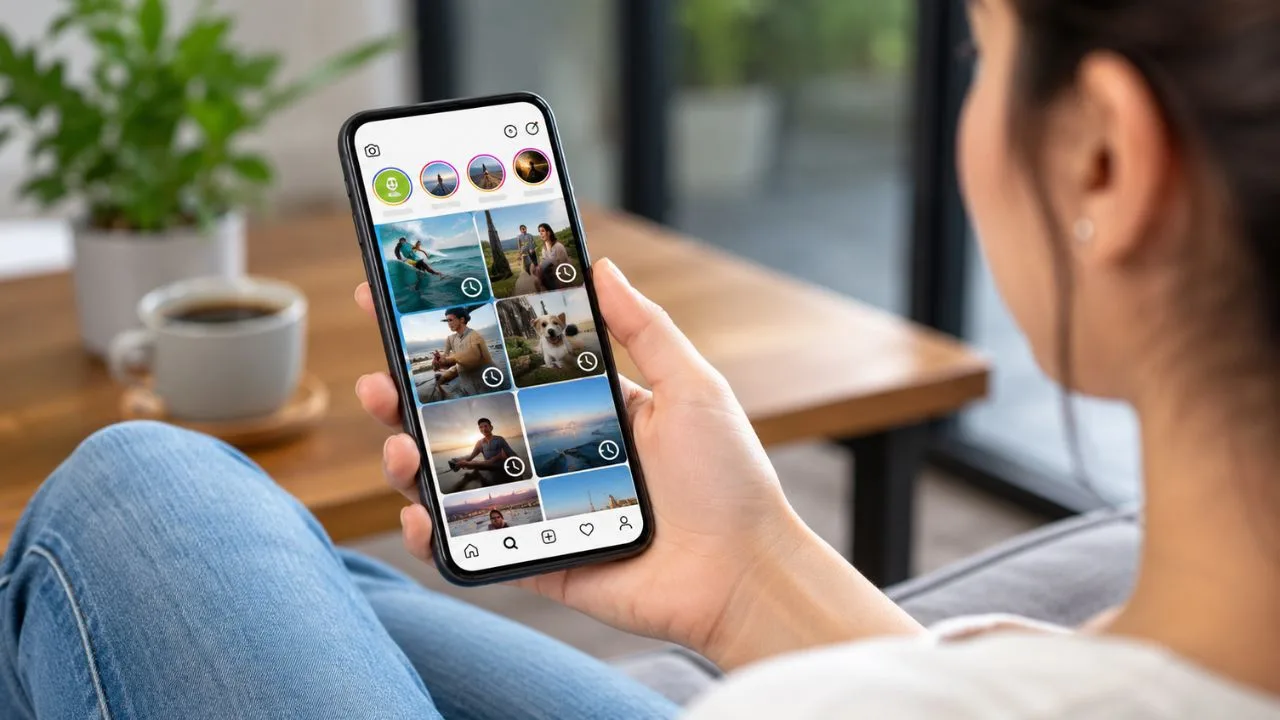
The feature is located inside the Your Activity section of the Instagram mobile app. It displays Reels watched during the available history period and includes tools for sorting or filtering the results. You can also remove individual Reels when you do not want them to remain in your viewing activity.
This guide explains how to see watch history on Instagram using an iPhone or Android device. It also covers how to filter your viewed Reels, delete watch activity, solve problems when the option is missing, and use alternative methods to recover an older Instagram video.
Can You See Your Watch History on Instagram?
Yes, Instagram now has a Watch History option for recently viewed Reels. You no longer have to like, comment on, share, or save a Reel before it appears in this section. Simply watching the Reel may be enough for it to become part of your recent viewing activity.
Instagram Watch History is primarily designed for Reels rather than every type of content available on the platform. It should not be confused with Account History, which shows changes made to your profile, or Link History, which contains websites opened through Instagram’s in-app browser.
The viewing page generally covers Reels watched within the previous 30 days. This means it is useful for recovering a video you saw earlier today, last week, or during the previous month. Reels viewed outside the available period may no longer appear in the dedicated history.
The feature also provides more control than a basic chronological list. You can change the sorting order, select a date range, filter by the account that posted a Reel, and remove selected videos. These controls make it easier to narrow hundreds of recently watched Reels to one relevant result.
How to See Watch History on Instagram on iPhone
Open the Instagram app on your iPhone and sign in to the account used when you watched the Reel. Tap your profile picture in the bottom-right corner to open your profile. Make sure you are checking the correct account if you manage several Instagram profiles in the same app.
Tap the three horizontal lines in the top-right corner of your profile page. This opens the main menu containing settings, account tools, saved posts, and other controls. Select Your activity, which is where Instagram organises many of your previous actions and interactions.
Scroll through the Your Activity page until you find Watch history. Tap the option to open a grid or list of recently viewed Reels. The newest videos may appear first, depending on the sorting option currently selected for your account.
Tap any thumbnail to open and replay that Reel. When trying to locate one particular video, use the available date, sorting, or account filters rather than scrolling through every result. Updating Instagram from the App Store may be necessary if Watch History does not appear.
How to See Instagram Watch History on Android
Launch the Instagram app on your Android phone and confirm that you are signed in to the correct profile. Tap your profile image in the lower-right corner of the screen. The location of some controls may vary slightly according to your app version or device interface.
Select the three-line menu in the upper-right corner of your profile. Tap Your activity from the available menu options. This section contains tools for managing likes, comments, searches, links, archived content, account changes, and other Instagram activity.
Scroll down and choose Watch history to see your recently watched Instagram Reels. The page should display thumbnails of videos played from your account during the supported history period. Selecting a thumbnail opens the original Reel when it is still available.
If the option is missing, open the Google Play Store and install the latest Instagram update. You can then close the app completely, reopen it, and check the Your Activity section again. Features may also appear differently when Instagram is testing interface changes across different accounts.
How to Filter Recently Watched Reels
A long Watch History can become difficult to search when you use Instagram regularly. Instead of scrolling through every video, open the sorting and filtering controls at the top of the history page. These controls help you narrow the results according to the limited details you remember.
You can sort viewed Reels from newest to oldest when you recently lost a video. This option is useful when the Reel disappeared after an accidental swipe, notification, phone call, or app refresh. The first few results may contain the video you were trying to recover.
You may also switch the order from oldest to newest. This can help when you know you watched the Reel near the beginning of the available history period. Choosing a custom date or date range can reduce the number of videos displayed even further.
Instagram may also let you filter Watch History by the account that posted the Reel. This is particularly helpful when you remember the creator but cannot find the exact video on their profile. Combine creator and date filters whenever one filter still produces too many results.
How Far Back Does Instagram Watch History Go?
Instagram Watch History normally shows Reels viewed during the past 30 days. It is not intended to be a permanent record of every video you have watched since creating your account. Older Reels may automatically disappear when they fall outside the supported period.
The 30-day window is still useful for most common situations. It gives you time to retrieve a recently viewed tutorial, entertainment clip, restaurant recommendation, news video, or shopping idea. The sooner you search, the more likely the video will still appear in your history.
Do not rely on Watch History as long-term storage for valuable Instagram content. A creator can delete a Reel, make an account private, deactivate their profile, or restrict your access. The original video may therefore become unavailable even when its previous viewing activity is recorded.
When you find something you may need later, use Instagram’s Save feature and place it in a relevant collection. Saving important Reels creates a more organised personal library than relying on temporary history. Collections can be created for recipes, workouts, travel, business ideas, products, or other topics.
What Content Appears in Instagram Watch History?
The feature mainly records Instagram Reels you have watched. These may include videos found through the Reels tab, Explore page, home feed, creator profiles, search results, or messages. A Reel may appear even when you did not like, comment on, or save it.
Instagram Watch History is not necessarily a complete record of Stories, Live broadcasts, photo posts, profile visits, or every standard feed video. Different content types have separate activity controls or may not provide a personal viewing log. The feature should therefore be treated specifically as a recently watched Reels tool.
Some viewed videos may be missing because the creator deleted them or changed the account’s privacy settings. Instagram may also remove content that violates its rules. A Reel that is no longer available cannot always be recovered through Watch History or another account section.
Your history may also differ between Instagram accounts. Watching a Reel while using one profile will not necessarily place it in the history of another profile saved on the same phone. Always switch to the account that was active when you originally watched the content.
How to Delete Instagram Watch History
Open your Instagram profile, tap the three-line menu, and select Your activity. Choose Watch history to display the Reels you recently viewed. Look for the Select or management option that allows you to choose one or more items from the page.
Select the Reel thumbnails you want to remove from your viewing activity. Review your choices carefully before completing the removal. Deleting an item from Watch History does not delete the creator’s Reel or remove it from Instagram.
Removing a Reel from history is different from unliking or unsaving it. When you previously interacted with the video, it may remain visible under Likes, Saved posts, comments, or direct messages. You must manage those activities separately when you want to remove every connection.
Deleting viewing activity may also make that Reel harder to find later. Consider saving important content before removing it from history. If your main goal is to influence recommendations, deleting history alone may not have the same effect as using Instagram’s content preference and suggested-content controls.
Why Is Instagram Watch History Not Showing?
The most common reason is that your Instagram app is outdated. Visit the App Store or Google Play Store, search for Instagram, and install any available update. The Watch History feature was added after many older app versions had already been released.
After updating, close Instagram fully and open it again. Go to your profile, tap the menu, and check Your activity rather than Account History or Search History. Watch History may appear lower on the page, so scroll through the entire section before assuming it is unavailable.
The feature may also be missing because you are using Instagram through a desktop browser or an interface that does not contain every mobile activity tool. The iPhone or Android app is generally the most reliable place to access recently watched Reels. Try the mobile app before looking for complicated alternatives.
Account-specific testing, cached app data, connection problems, or a temporary Instagram issue can also affect visibility. Restarting the device, signing out and back in, or reinstalling the app may help. Remember your login details and authentication method before removing the application from your phone.
How to Find a Reel Through Your Instagram Likes
When Watch History does not contain the video, check whether you tapped the heart while watching it. Open your profile, select the menu, and tap Your activity. Choose Likes to see recent posts and Reels you have liked from that account.
The Likes page may allow you to sort results and filter them by date or content author. Use these controls when you remember approximately when you viewed the Reel. Filtering is faster than manually reviewing every liked photo, carousel, and video.
Your liked activity can be especially useful for finding content older than the Watch History period. However, it only works when you actually liked the Reel. Watching, pausing, or replaying a video without pressing the heart will not place it in your liked-post list.
A Reel may disappear from Likes when you remove your reaction or the original content becomes unavailable. The creator may also switch to a private account that you no longer follow. In those cases, Instagram cannot always provide access to the original video.
How to Find a Reel Through Saved Posts
Saved posts are one of the most dependable ways to revisit valuable Instagram content. Go to your profile, tap the three-line menu, and choose Saved. You will see posts and Reels you deliberately bookmarked while using your account.
Instagram allows users to organise saved content into private collections. Open the collection that is most likely to contain the lost Reel, such as Food, Fitness, Marketing, Fashion, Home, or Travel. Meaningful collection names can significantly reduce the time needed to find old content.
Saving a Reel does not download the video to your phone. It creates a shortcut to the original Instagram post, which means the creator still controls its availability. Deleted posts, deactivated accounts, and removed content may no longer open from your collection.
When you recover a useful Reel through Watch History, consider saving it immediately. This protects you from losing it when the 30-day viewing period ends. For content you need for work or research, record the creator’s username and key details in a separate note as well.
Use Instagram Search to Recover a Lost Reel
Instagram Search can help when you remember the topic, creator, audio, caption phrase, or hashtag. Tap the magnifying-glass icon and enter the most specific words you can recall. Search terms such as a recipe name, product model, city, exercise, or spoken phrase may lead back to the video.
Try several variations rather than relying on one broad keyword. A search for “easy pasta recipe” may produce thousands of posts, while “creamy garlic pasta five ingredients” could create more relevant results. Add the creator’s name or location when you remember either detail.
The audio used in the Reel may provide another route. When you recognise the song or sound, search for its title and open the related audio page. Browse the Reels using that sound while looking for the creator, visual style, caption, or scene you remember.
Your recent Instagram searches may also provide clues. Open Search and review recent accounts, words, hashtags, or places you previously entered. Search History is not the same as Watch History, but it can remind you how you originally found the missing video.
Check Direct Messages and Shared Reels
Many Instagram users send interesting Reels to friends instead of saving them. Open your direct messages and review conversations with people who commonly exchange videos with you. The Reel may still be visible in the chat even when you cannot find it through Watch History.
Use the conversation search option when you remember a word from a message sent with the Reel. Searching for terms such as “recipe,” “funny,” “hotel,” or “buy this” may locate the relevant part of a long chat. The available search tools can vary by app version.
You should also review group chats because shared Reels are often posted there. Open conversations active around the date you remember watching the content. Messages sent immediately before or after the Reel may help you recognise the correct video.
A shared Reel can still become unavailable when the original creator deletes it or makes the content private. The chat may continue to show that something was shared, but it may not display the playable video. Asking the original sender can be the quickest solution in that situation.
Can Downloading Instagram Data Reveal Watched Videos?
Instagram allows users to export a copy of account information through Accounts Centre. The export may contain categories of activity, interactions, profile information, messages, and other account data. It is mainly useful when you need a broader record rather than one recently watched Reel.
To request an export, open Instagram’s menu and enter Accounts Centre. Choose Your information and permissions, select Export your information, and follow the instructions. You may be able to choose the account, date range, information categories, file format, and destination.
An information export should not be considered a guaranteed copy of every Reel you have ever watched. Available data categories and records can change, and some viewing details may be limited. The dedicated Watch History page is now the easier first option for recent Reels.
Data exports can also be difficult to search when they contain many files. HTML may be easier for an ordinary user to browse, while JSON is better suited to structured processing. Protect the downloaded archive because it can contain personal account information and private communication details.
Can Other People See Your Instagram Watch History?
Instagram Watch History appears inside the Your Activity area of the signed-in account. It is not displayed publicly on your profile like posts, follower counts, or profile information. Other Instagram users do not receive a public list showing every Reel you have watched.
Someone who has access to your unlocked phone or logged-in Instagram account may still be able to open the history. Use a secure device passcode, strong Instagram password, and two-factor authentication. Avoid leaving your account signed in on shared or public devices.
Watching a Reel is different from interacting with it. A creator may see overall view or reach information through Instagram Insights, but that does not mean every ordinary creator receives a complete named list of all viewers. Likes, comments, follows, and shares are more visible interactions.
Stories work differently because account owners can access viewer information for a limited period. Do not assume that the privacy behaviour of Reels, Stories, Live videos, and feed posts is identical. Each Instagram format has its own activity and insight features.
How to Avoid Losing Instagram Reels in the Future
Tap the bookmark icon whenever a Reel contains information you may want later. Saving takes only a moment and is more reliable than expecting Instagram Watch History to store it permanently. Add the Reel to a specific collection when it belongs to an important topic.
You can also send the Reel to yourself or to a trusted private chat. Add a short message explaining why it matters, such as “restaurant for London trip” or “exercise for lower back.” Descriptive messages make the content easier to recover through conversation search.
Following the creator can help when you regularly enjoy their content. You can then visit their profile and browse the Reels tab instead of searching across Instagram. However, creators may post frequently, so saving the exact video remains more efficient.
For important professional, educational, or purchasing information, keep a separate note containing the creator’s username, Reel topic, and date. Instagram content can be edited, removed, or restricted at any time. A simple external note prevents your research from depending entirely on one social platform.
Final Thoughts on Instagram Watch History
Learning how to see watch history on Instagram is now much easier because the app includes a dedicated section for recently watched Reels. Open your profile, tap the menu, choose Your Activity, and select Watch History. You can then browse, sort, filter, replay, or remove recent videos.
The feature is most useful when you lose a Reel before liking or saving it. Date-range and creator filters can reduce a large viewing history to a manageable set of results. Searching soon after losing the video gives you the best chance of recovering it within the available period.
When the history option is missing, update the Instagram mobile app and confirm you are checking the correct account. You can also search through liked posts, saved collections, direct messages, recent searches, creator profiles, audio pages, and exported account information.
Watch History should be treated as a convenient recovery tool rather than permanent storage. Save useful Reels and organise them into collections whenever you may need them again. This simple habit makes valuable Instagram content easier to revisit long after it disappears from recent activity.
Frequently Asked Questions
How do I see recently watched Reels on Instagram?
Go to your Instagram profile, tap the three-line menu, select Your activity, and open Watch history. You can then replay or filter your recently viewed Reels.
How far back does Instagram Watch History go?
Instagram Watch History generally displays Reels watched during the past 30 days. Older videos may need to be found through Likes, Saved posts, messages, or search.
Why can’t I see Watch History on Instagram?
Your app may be outdated, or you may be checking the wrong account or interface. Update Instagram and use the mobile app’s Your activity section.
Can I delete my Instagram Reel Watch History?
Yes, open Watch History, use the selection option, choose the Reels you want removed, and confirm the action. This does not delete the original creator’s content.
Does Instagram show who watched a Reel?
Ordinary Reel viewing does not work like a Story viewer list. Creators can access performance metrics, while visible actions such as likes and comments identify interacting accounts.