Credential Harvesting: How Hackers Steal Your Logins
Your login details can unlock far more than a single online account. A stolen email address and password may give a criminal access to private conversations, financial information, cloud storage, workplace systems, and other accounts connected to the same identity. This is why login credentials have become one of the most valuable targets in modern cybercrime.
Credential harvesting is the process of tricking, capturing, or extracting usernames, passwords, authentication codes, and other sign-in information. Attackers may use fake login pages, phishing emails, malicious software, fraudulent QR codes, or deceptive security alerts. Their goal is to make the victim believe that entering account information is safe and necessary.
Some credential theft attempts are easy to recognize, while others closely imitate trusted companies and familiar sign-in screens. A fake page may use the correct colors, logos, wording, and layout of a popular service. Criminals may even create a believable web address or place the fraudulent form inside a realistic-looking browser window.
Understanding how credential harvesting works can help you recognize suspicious requests before entering sensitive information. This guide explains common credential theft methods, warning signs, account takeover risks, and practical protection strategies. It also shows what individuals and businesses should do when login information may already have been stolen.
What Is Credential Harvesting?
Credential harvesting is a cyberattack technique used to collect information that allows someone to access an account or system. The stolen data may include usernames, email addresses, passwords, security answers, one-time verification codes, recovery details, and authentication tokens. Attackers use this information to impersonate legitimate users.
The word “harvesting” describes how criminals gather account credentials from many people or systems. Some attacks target one senior employee, customer, or administrator, while others send thousands of phishing messages at once. Even a low response rate can produce valuable stolen passwords when an attack reaches a large audience.
Credential harvesting is often associated with phishing, but the two terms are not identical. Phishing is a broader form of social engineering that may be used to steal money, install malware, or collect sensitive information. Credential theft is one possible objective of a phishing campaign.
A successful attack can lead to account takeover, identity theft, financial fraud, business email compromise, data breaches, and unauthorized network access. The attacker may use the account directly, sell the login details, or combine them with information collected from previous breaches. This makes stolen credentials useful long after the original attack.
Why Hackers Want Your Login Credentials
Usernames and passwords provide a simple way to bypass many security barriers. Instead of breaking into a system through a complicated technical vulnerability, an attacker can sign in using a legitimate employee or customer account. The activity may initially appear normal because the system recognizes the correct login information.
Email accounts are especially valuable because they often act as recovery tools for other services. Someone who controls your email may reset passwords, approve security changes, read private messages, and discover which banks, shopping sites, or cloud platforms you use. One compromised mailbox can therefore open the door to several additional accounts.
Business credentials can provide access to internal documents, customer records, payment systems, cloud applications, and confidential conversations. Administrator accounts are even more attractive because they may allow attackers to create users, change security settings, disable monitoring, or reach sensitive parts of the company network.
Criminals may also sell stolen login credentials through underground marketplaces. The value depends on the account type, available permissions, stored data, and likelihood that the login still works. Financial accounts, corporate email addresses, remote access credentials, and cloud administrator accounts are often considered particularly valuable.
How Credential Harvesting Attacks Work
Most credential harvesting attacks begin with a message designed to create urgency, concern, curiosity, or trust. The victim may receive a warning that an account will be suspended, a payment failed, a document is waiting, or unusual activity was detected. The message encourages immediate action before the person has time to examine it carefully.
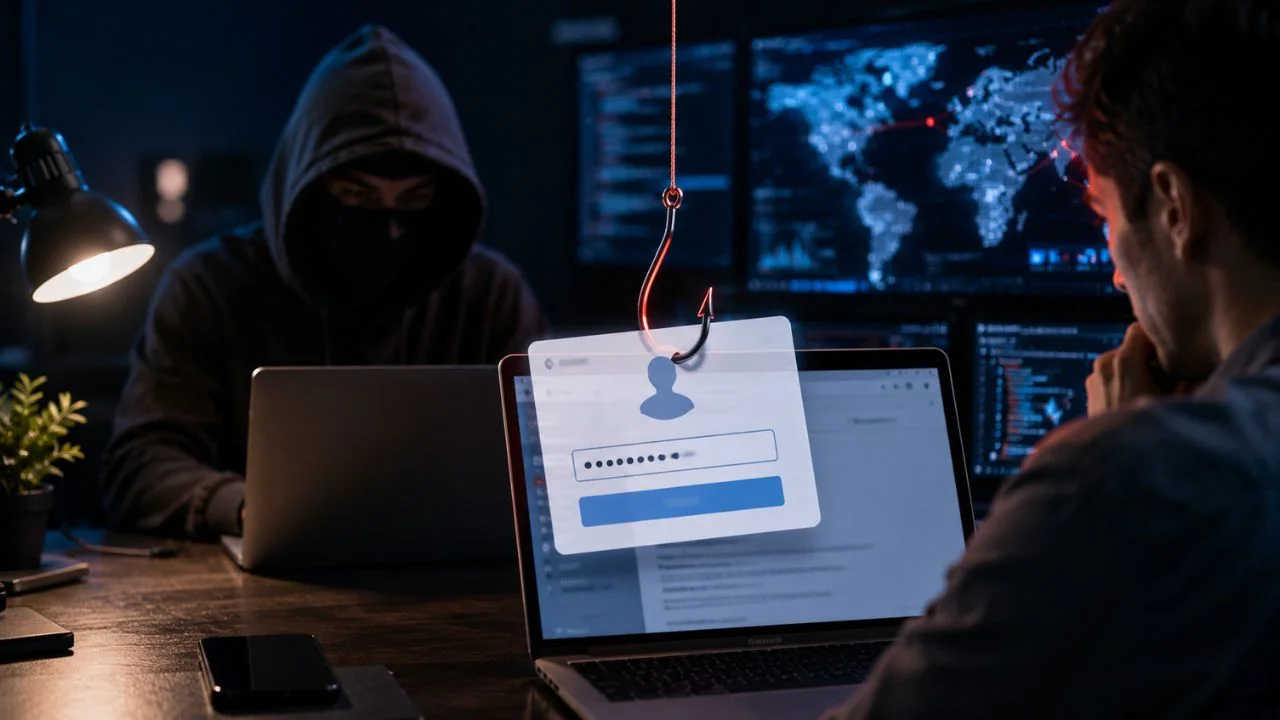
The victim is usually directed to a fake login page that imitates a trusted service. After entering a username and password, the information is sent to the attacker instead of the real company. The page may then display an error or redirect the victim to the legitimate website to reduce suspicion.
Some attacks request additional information after collecting the password. The fraudulent page may ask for an authentication code, security answer, phone number, or recovery email. This allows the attacker to overcome multiple security checks and attempt to access the account while the victim is still interacting with the fake page.
Once inside, the criminal may change recovery details, create forwarding rules, download information, or search for valuable messages. The attacker may also send phishing emails from the compromised account. Messages coming from a familiar person or real company address are more likely to deceive additional victims.
Phishing Emails and Fake Login Pages
Phishing emails remain one of the most common tools used for credential harvesting. They may pretend to come from a bank, delivery company, streaming service, employer, government department, or cloud provider. The message often includes a button or link that appears to lead to an official sign-in page.
A convincing phishing email may contain the recipient’s name, workplace, job title, or details taken from public sources. This personalization can make the request feel genuine. Attackers may also copy real email templates, privacy notices, support language, and branding to reduce visible differences between the fake message and legitimate communication.
The linked website is designed to capture whatever information the victim enters. It may display a realistic single sign-on screen, Microsoft 365 login, Google account prompt, banking portal, or employee dashboard. Some fraudulent pages also detect which email address was entered and automatically display the matching company logo.
Carefully checking the destination before signing in can prevent many credential phishing attacks. Instead of opening the provided link, users should visit the service through a saved bookmark, official application, or manually entered address. Unexpected login requests should be treated with caution even when the message appears professional.
Smishing, Quishing and Social Media Scams
Credential harvesting is not limited to email. Smishing attacks deliver fraudulent requests through text messages, messaging applications, or mobile notifications. These messages may claim that a package could not be delivered, a bank account is locked, or a small payment is required to complete a transaction.
Mobile users are particularly vulnerable because smaller screens can hide important parts of a web address. People may also act quickly when they receive an urgent text while traveling, working, or completing another task. A short message with a familiar company name can therefore be enough to encourage an unsafe click.
Quishing uses QR codes to direct victims toward fraudulent websites. A malicious code may appear in an email, printed letter, parking notice, poster, restaurant menu, or sticker placed over a legitimate code. Because the destination is not immediately visible, users may scan the code without knowing where it will lead.
Social media messages may also promote fake giveaways, verification programs, copyright warnings, business opportunities, or security alerts. The victim is asked to sign in through a provided link to confirm ownership or prevent account suspension. These scams frequently target creators, online sellers, business pages, and users with large audiences.
Infostealer Malware and Password Theft
Not every credential harvesting attack depends on a fake website. Infostealer malware is designed to search an infected device for valuable account information. It may collect saved browser passwords, cookies, cryptocurrency wallet data, email credentials, browsing history, and information stored inside applications.
Malware can arrive through fraudulent software downloads, pirated programs, fake browser updates, malicious attachments, and infected advertisements. A file may appear to be a useful tool, invoice, game modification, document, or security application. Once opened, it can collect information without displaying an obvious warning.
Saving passwords in a browser is convenient, but an infected device may expose that stored information. Attackers may also steal session cookies, which allow websites to remember that a user has already signed in. In some cases, a stolen session can provide account access without requiring the attacker to enter the password again.
Endpoint protection, software updates, safe download habits, and application controls help reduce the risk of infostealer malware. Users should avoid unknown browser extensions, unofficial software sources, and unexpected files. A password change alone may not solve the problem when the device remains infected or active sessions have not been revoked.
Credential Stuffing and Reused Passwords
Credential stuffing occurs when attackers test login details stolen from one service against many other websites. This technique works because some people reuse the same email address and password across multiple accounts. A breach involving one unimportant service can therefore expose much more valuable accounts.
The attacker may use automated tools to test large collections of usernames and passwords. Successful logins can then be used for fraud, unauthorized purchases, data theft, or further phishing. The affected service does not need to have experienced a direct breach because the password may have been stolen elsewhere.
Small password variations may not provide enough protection. Changing “Password1” to “Password2” across different websites creates a pattern that can be guessed. Names, birthdays, keyboard sequences, and common phrases are also easier to predict than long, unique passwords generated for each account.
A reputable password manager can create and store different passwords for every service. This prevents one exposed password from unlocking several accounts. Users only need to protect the password manager with a strong master password and should enable the strongest available form of multifactor authentication.
How Attackers Bypass Multifactor Authentication
Multifactor authentication adds an important security layer, but attackers may still attempt to manipulate users into approving access. A fake login page can collect the username and password before requesting the one-time code sent to the victim. The criminal may immediately use that code on the real website.
MFA fatigue attacks repeatedly send authentication approval requests to a user’s device. The attacker hopes the person will approve one request accidentally or simply to stop the notifications. A follow-up phone call or message may pretend to come from technical support and pressure the victim into accepting the request.
Criminals may also use reverse-proxy phishing pages that communicate with the legitimate service in real time. These pages can capture passwords, authentication responses, and session tokens. The victim may successfully reach the real account afterward, making the attack more difficult to notice immediately.
Phishing-resistant authentication provides stronger protection against these techniques. Passkeys and hardware security keys verify the legitimate website before completing authentication. Number matching, device checks, location information, and restricted administrator access can also reduce the chance of an accidental or fraudulent approval.
Warning Signs of a Credential Harvesting Attempt
Unexpected urgency is one of the most common warning signs. A message may claim that your account will be deleted, a payment will fail, or access will be removed unless you respond immediately. This pressure is intended to make you act before checking whether the request is genuine.
The sender’s address and linked destination may contain subtle differences. Attackers often replace letters, add extra words, use unfamiliar domains, or create addresses that appear official at first glance. However, a correct-looking sender address alone is not proof of legitimacy because accounts and email systems can be compromised.
Poor grammar can indicate a scam, but professional writing does not guarantee safety. Modern phishing messages may be polished, personalized, and free from obvious errors. A more useful question is whether the request is expected, whether the sender normally communicates this way, and why another login is suddenly required.
Unusual sign-in pages should also raise concern. The page may request information that the service does not normally ask for, such as a recovery phrase or complete security answer. Missing password-manager suggestions can also be a warning because the fake domain does not match the saved login destination.
Signs That Your Credentials Were Already Stolen
Unexpected password reset messages may indicate that someone is trying to gain control of your account. You may also receive alerts about sign-ins from unfamiliar locations, devices, browsers, or operating systems. These warnings should be investigated through the official application or website rather than through links inside the alert.
Changes to account settings are another serious sign. Attackers may add recovery addresses, create email forwarding rules, register new authentication methods, or remove trusted devices. They may also mark messages as read, delete security notifications, or change notification preferences to hide their activity.
Friends, customers, or coworkers may report suspicious messages sent from your account. The attacker may ask them to open a document, make a payment, buy gift cards, or share login details. A compromised account provides credibility because the fraudulent request comes from a real address and an existing conversation.
Other warning signs include unauthorized purchases, missing files, unfamiliar applications, locked accounts, and unexpected subscription changes. Users should not assume that a password change has solved everything. Active sessions, connected applications, email rules, recovery methods, and infected devices must also be checked.
How Individuals Can Prevent Credential Theft
Use a unique password for every important account. Long passwords generated by a password manager are generally more difficult to guess and do not need to be memorized individually. Reusing one password across email, banking, shopping, and social media accounts greatly increases the impact of a single data breach.
Enable multifactor authentication wherever it is available, especially for email, financial services, cloud storage, and password managers. Authenticator applications, passkeys, and security keys are usually stronger than text-message codes. Never approve an authentication prompt that you did not personally initiate.
Avoid signing in through unexpected links. Open the official application or enter the trusted website address manually when a message claims that action is required. Password managers can provide another layer of protection because they normally fill credentials only when the website domain matches the saved account.
Keep devices, browsers, applications, and security software updated. Download programs only from trusted sources and review browser extensions regularly. Device encryption, screen locks, remote-wipe options, and automatic security updates also help protect saved account information if a phone or computer is lost or stolen.
How Businesses Can Stop Credential Harvesting
Businesses should begin by requiring strong authentication for email, cloud applications, remote access, and administrator accounts. Phishing-resistant MFA should be prioritized for users with sensitive permissions. Legacy authentication methods that do not support modern security controls should be disabled wherever possible.
Email security systems can inspect suspicious links, attachments, impersonation attempts, and newly registered domains. Web and DNS filtering can block access to known malicious destinations. These tools should support employee awareness rather than creating a false belief that every dangerous message will be blocked automatically.
Regular security training should teach employees how attacks appear in realistic situations. Staff should practice checking login pages, reporting suspicious prompts, handling MFA requests, and verifying unusual payment or password-reset instructions. Short, frequent exercises are often easier to remember than one large annual presentation.
Organizations should also use least-privilege access, device management, endpoint detection, and centralized login monitoring. Alerts for impossible travel, unfamiliar devices, repeated failures, mailbox forwarding changes, and unusual administrator behavior can reveal account takeover attempts. Fast detection limits how long stolen credentials remain useful.
Why Passkeys Improve Login Security
Passkeys allow users to sign in without entering a traditional password. They rely on cryptographic credentials stored on an approved device or password manager. The private part of the credential remains protected, while the website receives only the information needed to verify the login.
Unlike passwords, passkeys are connected to the legitimate website for which they were created. A fake login page cannot easily collect and reuse them on another domain. This provides strong protection against common credential harvesting pages that depend on users typing sensitive information into fraudulent forms.
Passkeys can also improve convenience because users may authenticate with a fingerprint, facial recognition, device PIN, or security key. There is no complex password to remember, reuse, or accidentally reveal. Synchronization options may allow approved devices to access the same credentials securely.
Organizations do not need to replace every password immediately to benefit from this approach. They can begin with high-risk accounts, administrators, employees, and users who regularly access sensitive systems. Clear recovery procedures remain important so account access can be restored safely when a device is lost.
What to Do After a Credential Harvesting Attack
Change the affected password immediately by opening the official website or application directly. Choose a completely new password rather than a small variation of the previous one. Any other account using the same or a similar password should also be updated as quickly as possible.
Sign out of all active sessions and remove unfamiliar devices. Review recovery email addresses, phone numbers, authentication methods, connected applications, and account permissions. Email users should also check forwarding rules, filters, deleted messages, and recent activity for unauthorized changes.
If malware may be involved, disconnect the affected device from sensitive accounts until it has been examined. Run reputable security scans, remove suspicious software, update the operating system, and review browser extensions. In serious cases, professional support or a complete device reset may be necessary.
Notify the employer, bank, service provider, customers, or contacts when the compromised account could affect them. Businesses should activate their incident response process and preserve useful evidence. Quick reporting can help stop fraudulent payments, prevent further phishing, and reduce the damage caused by account misuse.
Common Credential Security Mistakes
Using the same password across multiple services remains one of the most damaging mistakes. People often reuse credentials because remembering many passwords is difficult. However, this convenience allows credential stuffing attacks to turn one exposed account into several successful compromises.
Another mistake is trusting a message simply because it includes accurate personal information. Attackers may know your name, employer, phone number, recent purchase, or account type from public profiles and previous breaches. Personalization makes a message more convincing, but it does not make the request legitimate.
Some users believe that multifactor authentication makes them completely protected. MFA greatly reduces risk, but users must still reject unexpected prompts and protect recovery methods. Weak backup options, stolen sessions, compromised devices, and fraudulent support requests can still lead to unauthorized access.
Ignoring security alerts is equally dangerous. People sometimes dismiss repeated login notifications because they assume the system made an error. Every unfamiliar sign-in, password reset, or account change deserves attention, particularly when several warnings appear within a short period.
Final Thoughts on Credential Harvesting
Credential harvesting succeeds by targeting human trust as much as technical weaknesses. Attackers create believable situations that encourage people to enter information, approve access, or ignore warning signs. Recognizing this pressure can help users pause and verify a request before taking action.
The strongest defense combines unique passwords, password managers, multifactor authentication, passkeys, updated devices, and cautious browsing habits. Businesses should add phishing-resistant authentication, email filtering, employee training, access controls, and login monitoring. These layers make stolen credentials harder to obtain and less useful.
Security awareness should focus on practical behavior instead of fear. People need simple ways to report suspicious requests, confirm unusual instructions, and recover from mistakes. Blaming victims can discourage early reporting and give attackers more time to misuse compromised accounts.
Your login details protect your identity, money, conversations, and digital work. Treat every unexpected sign-in request carefully, especially when it creates urgency or asks for additional verification information. A few moments of checking can prevent weeks or months of recovery from account takeover.
Frequently Asked Questions
What is an example of credential harvesting?
A common example is a phishing email linking to a fake Microsoft, Google, banking, or social media login page. The page records the username and password entered by the victim.
Is credential harvesting the same as phishing?
Credential harvesting is often performed through phishing, but phishing has broader goals. A phishing attack may also spread malware, steal money, or collect personal and financial information.
Can hackers steal credentials with MFA enabled?
Yes, some attackers use fake pages, stolen session cookies, or fraudulent approval requests to bypass weaker MFA methods. Passkeys and hardware security keys provide stronger phishing resistance.
What should I do if I entered my password on a fake site?
Change the password through the official website immediately, sign out of active sessions, enable stronger authentication, and review account settings. Update other accounts using the same password.
Can a password manager prevent credential harvesting?
A password manager can reduce the risk because it normally fills credentials only on the correct website. It also helps users create unique passwords that cannot be reused in credential stuffing attacks.